Back Up or Export Your Data
Overview
Your data belongs to you.
Whether you'd like a copy of your portfolio for your own records, are moving information between systems, or simply want the peace of mind that comes from having a backup, PaTMa makes it easy to export your data at any time.
A backup includes both the information you've entered into PaTMa and any documents you've uploaded, all provided in widely used file formats.
Creating a Backup
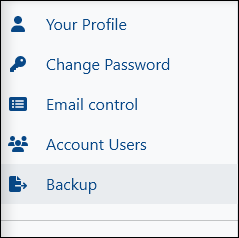
To get started, head to Your Profile and select Backup from the left-hand menu.
From the Backup page, select Start New Backup.
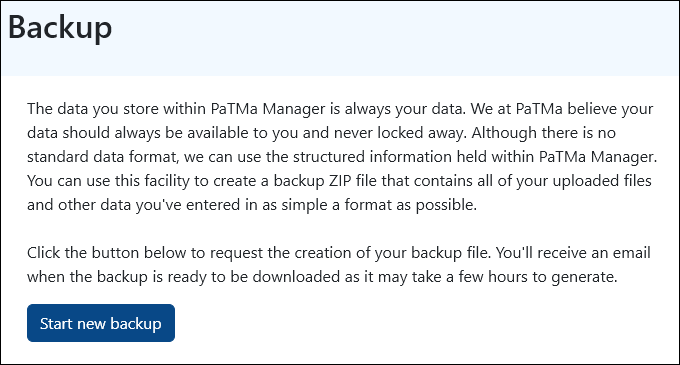
PaTMa will begin preparing your backup in the background.
Depending on the size of your portfolio, this process may take a few hours to complete. Once it's ready, we'll send you an email to let you know.
Simply return to the Backup page and select Download to retrieve your backup.
What's Included?
Your backup is downloaded as a .zip file and contains:
- Property information
- Tenancy records
- Financial records
- Tasks and reminders
- Uploaded images and documents
- Other portfolio-related information
Documents are included in their original formats, whilst portfolio data is exported as .csv files that can be opened in spreadsheet software such as Microsoft Excel, Google Sheets or LibreOffice Calc.
This means you always have access to your information in formats that can be viewed independently of PaTMa.
A Quick Tip
Whilst a backup is being generated, it's best to avoid making significant changes to your portfolio.
This helps ensure that the exported data reflects a consistent snapshot of your account.
Restoring Data
Backups are primarily intended as an export of your information rather than a self-service restore tool.
However, if data has been removed accidentally or a significant issue has occurred, the PaTMa team may be able to assist with restoring information from a backup.
Because restoration is a manual process, an additional charge may apply depending on the complexity of the request.
If only a small amount of information is missing, it may be quicker to review the exported files and re-enter the data manually.
If you need help restoring data, please get in touch and we'll be happy to discuss the available options.