Edit Tenancy
Overview
Need to update tenancy information after it has been created?
Whether you've entered the wrong rent amount, need to adjust tenancy dates, or want to update deposit information, PaTMa allows you to edit tenancy details without needing to delete or recreate the tenancy.
This helps keep your records accurate while preserving all existing tenancy history.
Editing a Tenancy
To edit a tenancy, start by selecting the relevant property from Your Portfolio and open the Tenancies tab.
A list of current tenancies will be displayed.
ℹ️ This is the tenancy list, not the main tenant list. A tenancy is separate from tenancy-related items such as the Tenancy Agreement or the Tenancy Checklist.
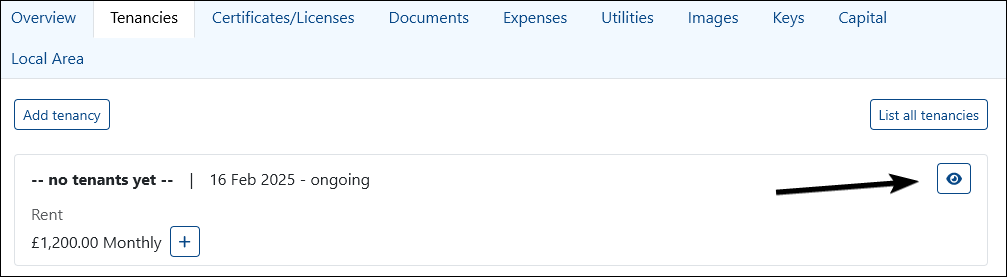
Locate the tenancy you want to update and select the View (eyeball) icon.
From the tenancy overview page, select Edit in the top-right corner.

Updating Tenancy Information
The same form used when creating a tenancy is used when editing it.
Any existing tenancy data will already be populated, allowing you to review and update the information as needed.
Common changes include:
- Updating rent amounts
- Adjusting tenancy dates
- Editing deposit information
- Adding or updating notes
- Updating rent review settings
Once you've made your changes, select Save.
Your updated tenancy information will be stored immediately.
A Quick Tip
In most cases, editing a tenancy is preferable to deleting and recreating it, as this preserves the tenancy's existing history, documents and financial records.
Only delete a tenancy if it was created in error and is no longer needed.