Upload Documents via Email
Overview
Constantly downloading attachments just to upload them again into PaTMa?
With Document Email Uploads, you can send or forward attachments directly into your PaTMa account by email, making document management much quicker.
This is especially useful for documents you regularly receive by email, such as:
- Safety certificates
- Contracts and agreements
- Supplier invoices
- Property manuals
- Compliance documents
Once received, documents are stored in your Document Inbox, ready to be reviewed and assigned within PaTMa.
Enabling Document Emails
Before you can send documents by email, you'll need to enable your unique PaTMa document email address.
Open Property Manager Settings and enable:
'Create an email address to send or forward document attachments'
Click Save.
PaTMa will then generate a unique email address linked to your account.
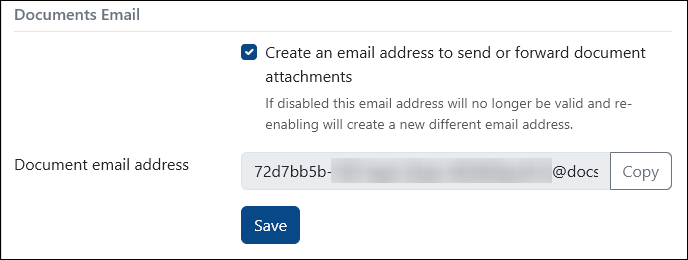
This email address is private and only intended for uploading documents into your account.
⚠️ We recommend keeping this email address private and not sharing it with other people.
Sending Documents to PaTMa
Once your document email address has been created, uploading documents is simple.
Just send or forward an email containing attachments to your PaTMa document email.
That's it.
Any attachments sent to this address will automatically appear in your PaTMa Document Inbox, ready for review.
This can save a lot of time when processing documents received from suppliers, agents or service providers.
Reviewing Received Documents
You can access your Document Inbox from the left-hand navigation menu.
All newly received documents appear in the Pending tab.
Before documents are added to your portfolio, you'll need to review and approve them.
This gives you an opportunity to confirm the document is valid and classify it correctly.
Select a document to review it.
You can then:
- Classify the document
- Assign it to the correct category
- Save it into your portfolio
- Delete it if no longer needed
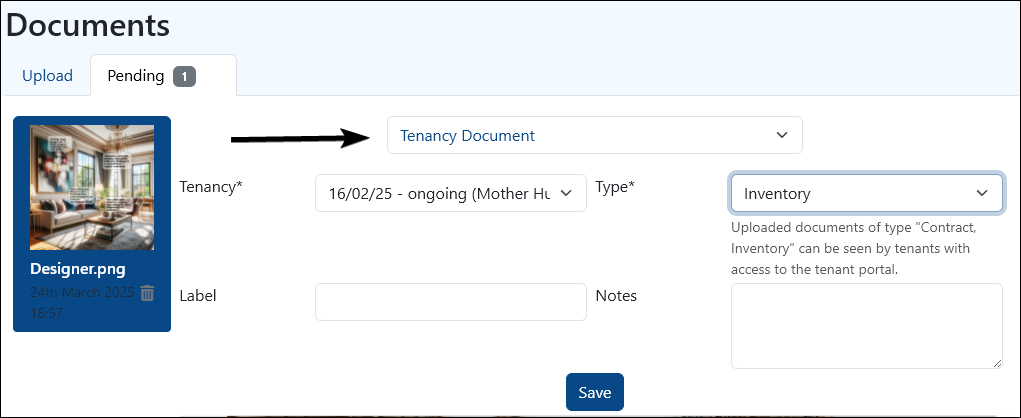
For example, if a document is classified as an EPC, it will automatically be stored in the relevant certifications area of PaTMa.
This helps keep your documents organised without needing to manually upload files multiple times.
Using Inbox Documents
Documents stored in your inbox can be used anywhere PaTMa requests a file upload.
Common examples include:
- Safety certificates
- Tenancy documents
- Contracts
- Tasks
- Compliance records
Whenever you see the From Inbox button, you can select a document directly from your inbox instead of uploading it manually.

This makes it easy to reuse previously received documents across multiple areas of the platform.
Deleting Documents
If a document is still in the Pending tab, it can be deleted by selecting the trash icon.
Once a document has been approved and classified, it is stored in the relevant area of your PaTMa account.
At that point, it can be deleted from that location just like any document uploaded manually.
A Quick Tip
Document Email Uploads work best when used as a central document intake system.
Many landlords simply forward certificates, invoices and contracts into PaTMa as soon as they receive them, helping keep everything organised in one place with minimal effort.