Calendar
Overview
Keeping on top of a property portfolio can quickly become a challenge. Rent due dates, certificate renewals, tenant enquiries, supplier visits and maintenance tasks can all pile up if they're managed separately.
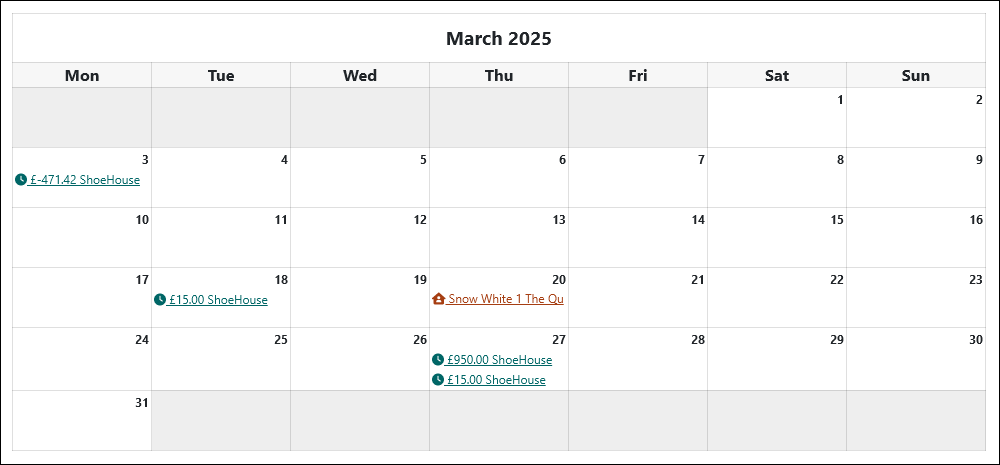
To help with this, PaTMa includes an integrated calendar that automatically pulls information from across the platform and displays it in one place.
The best part? There is nothing extra to set up.
As you add information elsewhere in PaTMa, the calendar updates automatically, helping you stay organised and spot upcoming events before they become a problem.
What's Included?
The calendar automatically displays important events from across your portfolio, including:
| Item | Description |
|---|---|
| Due Rents | Scheduled rent due for active tenancies. |
| Rent Payments | Dates rent payments have been received. |
| Certificate & Insurance Expiry | Upcoming expiry dates for certificates and insurance policies. |
| Mortgage Expiry | Expiry dates for fixed-rate mortgage products. |
| Tasks | Due dates for tasks created within PaTMa. |
| Repeating Expenses | Scheduled recurring expenses and outgoings. |
| Tenant Enquiries | Messages received from tenants. |
| Tenant Viewings | Scheduled property viewings with prospective tenants. |
Because the calendar is linked directly to your portfolio, events are added automatically as you use PaTMa.
Viewing Events
You can access the calendar at any time from the left-hand navigation menu.
Hover over any calendar entry to see a summary of the event, or click it to open the related record.
For example, clicking on a rent payment will take you directly to the rent record, whilst selecting a task will open the task itself.
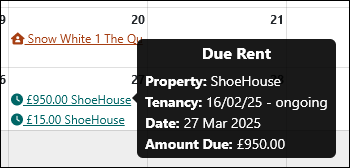
This makes it easy to move between your schedule and the information behind each event without needing to search for it manually.
Using Filters
As your portfolio grows, the calendar can become quite busy.
To help you focus on what matters most, filters allow you to display specific event types.
For example, you may wish to view:
- Upcoming certificate expiries
- Outstanding tasks
- Rent-related events
- Property viewings
Simply select the relevant filter to customise the calendar view.

Did You Know?
The calendar is populated automatically from information entered elsewhere in PaTMa, so there is no need to maintain a separate diary or manually create events.
As long as your property records are up to date, your calendar will be too.