Tenant Portal
Access the Tenant Portal here: https://app.patma.co.uk/tenant/
The Tenant Portal gives tenants a simple way to access important tenancy information, download documents, report problems and communicate with their landlord or agent, all without needing access to a Property Manager account.
If you're using PaTMa to manage your tenancies, the Tenant Portal can save you from repeatedly sending documents or answering questions about information tenants can already access themselves.
For Landlords and Agents
Subscription required: Property Manager Pro
Activating the Tenant Portal for a Tenant
There isn't a complicated setup process for each tenant.
To give a tenant access to the Tenant Portal, simply make sure their PaTMa record has a valid email address or phone number saved.
That's it.
Once the tenant has their contact details recorded, they can use the Tenant Portal to authenticate and access the information available to them.
Making Documents Available
Most documents that are relevant to the tenant will automatically be made available through the Tenant Portal.
Some important compliance documents are required to be available to tenants, so PaTMa will ensure these are made available where appropriate.
You can also choose to share additional documents by selecting Available to tenants on the tenant portal when uploading or editing a document.
This is useful for documents such as:
- Property manuals
- Additional certificates
- Instructions
- Other information you want your tenants to be able to access
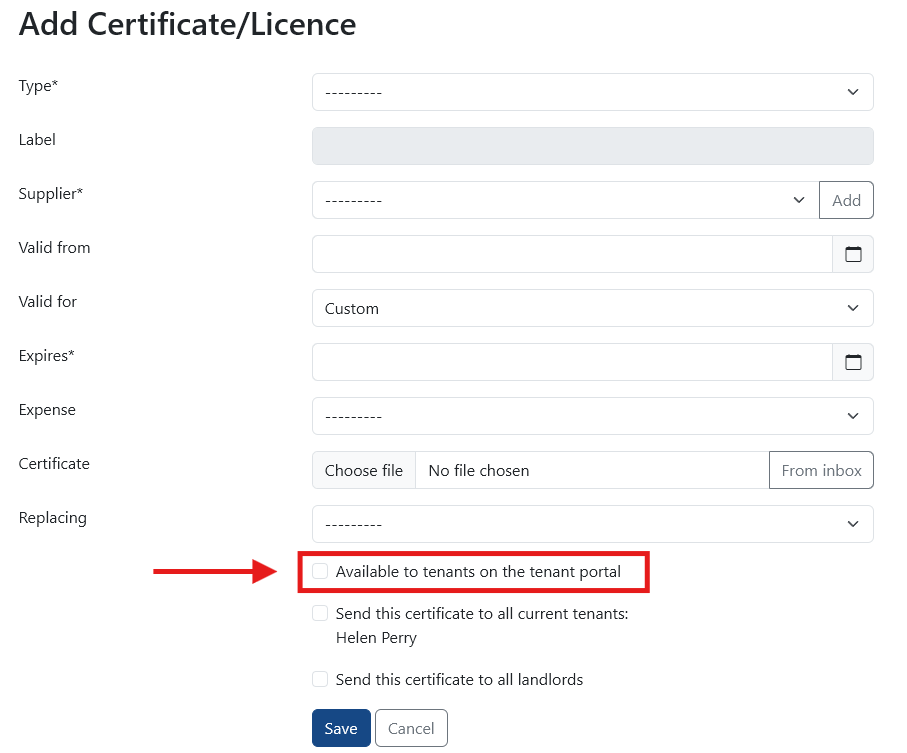
Once a document has been made available, the tenant will find it in the Documents section of their portal.
Messaging Tenants
PaTMa includes a tenant messaging system, allowing you to keep correspondence with your tenants organised within your PaTMa account.
To start a conversation, go to Tenant Management and find the tenant you want to contact.
Select the speech bubble icon next to their name.

The Contact tab allows you to email the tenant directly from PaTMa.
When the tenant receives your message, they'll be given a link they can use to reply.
Their replies will then appear in the same area of your PaTMa account, where you can continue the conversation.
You can also view conversations with all tenants from the messages section within Tenant Management.
What Do I Need to Do as a Landlord or Agent?
There isn't much to set up once the Tenant Portal is available on your account.
The main things to check are:
- The tenant has a valid email address or phone number recorded in PaTMa
- Any documents you want the tenant to access have been made available to them
- You have provided the Tenant Portal link to your tenants
Once they're logged in, tenants can access the information and documents you've made available, report problems and contact you through the portal.
For Tenants
What Can I Do in the Portal?
Once you've logged in, you'll have access to information and tools relating to your tenancy.
This includes:
- View your tenancy information
- See your current rent amount
- Check when your next rent payment is due
- See any outstanding rent
- View and download documents your landlord or agent has made available
- Report maintenance problems
- Add images or attachments when reporting a problem
- View updates and previous reports
- Send messages to your landlord or agent
- Receive messages from your landlord or agent
Everything is kept in one place, making it easier to find the information you need and keep your landlord or agent updated when something needs attention.

How Do I Log In?
You don't need to remember a password.
Instead, you use your email address to request a one-time login code.
Your landlord or agent will need to make sure the email address recorded against your tenancy is correct, as this is where your login code will be sent.
Step 1: Open the Tenant Portal
Open the Tenant Portal here:
https://app.patma.co.uk/tenant/
If your landlord or agent has provided you with a different Tenant Portal link, use that instead.
Step 2: Enter Your Email Address
Enter the email address recorded against your tenancy and select Submit.
Step 3: Enter the Login Code
PaTMa will send a unique login code to your email address.
Open the email, copy the code and enter it into the Tenant Portal.
Once the code has been accepted, you'll have access to your portal.
Tip: If you don't receive your login code, check that you're using the email address your landlord or agent has recorded for your tenancy. If you're still having trouble, contact them to check your details.
Tenancy Information
The tenancy section gives you an at-a-glance view of your rental information.
You can see:
- Property address
- Tenancy start date
- Current rent amount
- Next rent payment due
- Any outstanding rent
This means you can check your basic tenancy and rent information whenever you need it.
Documents
The Documents section allows you to download documents that your landlord or agent has made available to you.
Depending on your tenancy, this may include:
- Tenancy contracts
- Inventories
- Safety certificates
- Property manuals
- Other tenancy documents
Reporting a Problem
You can report maintenance issues directly through the Tenant Portal.
For example, if you discover a broken tap, you can open the reporting section and provide details about the problem.
You can also attach an image or other file to help explain what's wrong.
Once you submit the report, PaTMa will notify the relevant landlord or agent and save the report in the portal.
This means you can report problems without needing to rely on a phone call or email.
Reports and Messages
After you've reported a problem, you can return to the Reports and Messages section to see what has happened.
This provides a record of your previous reports and any updates from your landlord or agent.
For example, if you've reported a broken tap, you can return to the portal to follow the progress of the issue.
Messaging Your Landlord or Agent
The Tenant Portal also gives you a direct way to contact your landlord or agent.
From Ask Your Landlord / Agent a Question, you can send a message and include attachments if required.
Messages from your landlord or agent are also available within the portal, so you have a record of previous communication in one place.
A Quick Tip
The Tenant Portal is designed to give you one place to find your tenancy information, documents and messages.
If you're looking for a document, need to report a problem or want to contact your landlord or agent, check the portal first. You may be able to find what you need without having to send a separate email.