Switch Property Type (Single-Let / HMO)
Overview
When setting up a property in PaTMa, you'll be asked whether it is a standard single-let property or a multi-unit property such as an HMO.
If the way the property is managed changes in the future, these settings can be updated at any time.
Common reasons for making this change include:
- Converting a single-let property into an HMO
- Converting an HMO back into a single-let property
- Updating HMO licensing information
- Changing how units within a property are managed
Updating the Property Type
Open the property from Your Portfolio and select Edit.
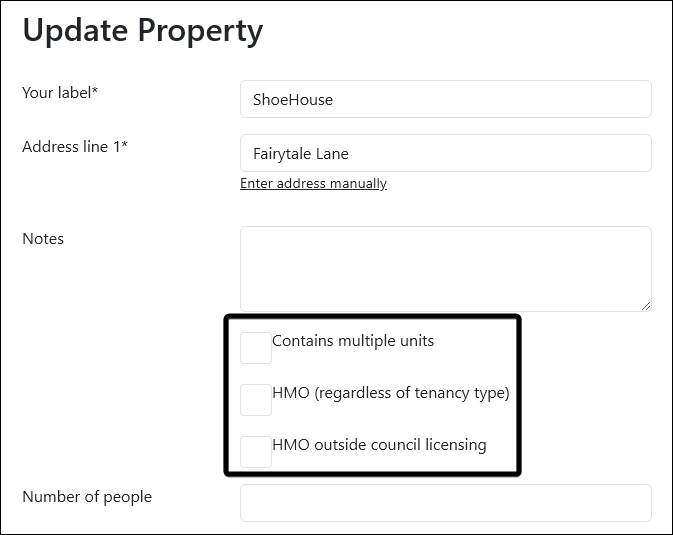
From here you'll find the settings that control how the property is configured within PaTMa.
If the property is being converted into an HMO or other multi-unit property, enable the relevant options:
| Option | Description |
|---|---|
| Contains Multiple Units | Configures the property as a multi-unit property. |
| HMO (Regardless of Tenancy Type) | Marks the property as an HMO and enables HMO-specific settings. |
| HMO Outside Council Licensing | Used where the property is an HMO but is exempt from mandatory licensing requirements. |
Once complete, click Save.
Converting an HMO Back to a Single-Let
If the property is no longer being managed as an HMO, return to the same screen and remove the relevant HMO options.
| Option | Description |
|---|---|
| Contains Multiple Units | Removes the multi-unit configuration. |
| HMO (Regardless of Tenancy Type) | Removes the HMO designation. |
| HMO Outside Council Licensing | Removes the HMO exemption status. |
Click Save to update the property.
Before You Make Changes
Changing a property's type may affect how units, tenancies and other property information are managed within PaTMa.
Before saving any changes, make sure the property settings accurately reflect how the property is currently being let and managed.