Download Rent Records
Overview
Need to review rent payments for a tenancy? Preparing records for your accountant, tax return or bookkeeping?
PaTMa makes it easy to view your rent history directly within the app or export it as a spreadsheet for external use.
You can see a complete record of rent payments, including payment dates, rent schedules and payment amounts.
If you're looking to add or edit rent transactions rather than download them, see Adding Rent Payments.
Viewing Rent Records
To view rent records, start by selecting the relevant property from Your Portfolio.
Next, open the Tenancies tab and locate the tenancy you want to review.
Select the View (eyeball) icon next to the tenancy.
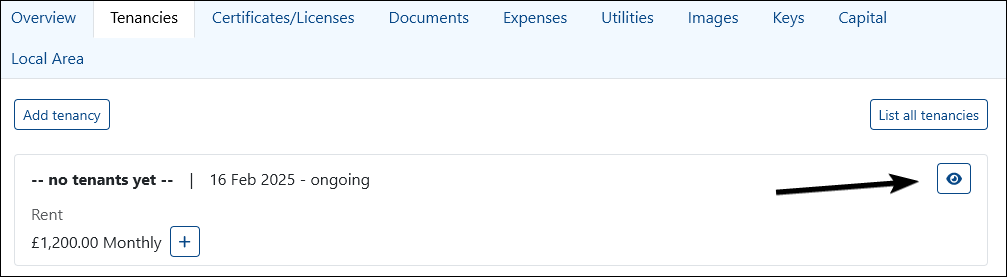
From the Tenancy Overview, select Rent.
This will open the rent history for that tenancy.
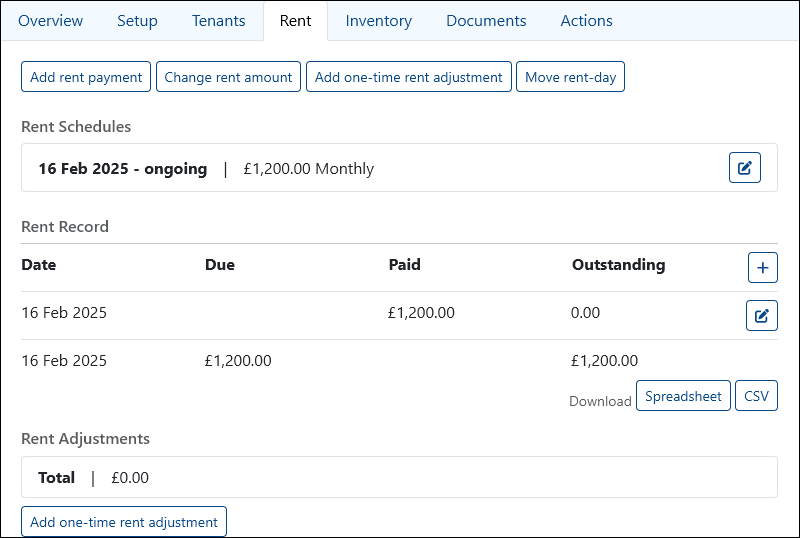
Here you can review:
- Rent amount
- Rent schedule
- Payment due dates
- Logged rent payments
- Historical payment records
This gives you a complete view of rent activity for the tenancy in one place.
Downloading Rent Records
Need a copy outside PaTMa?
Rent records can be downloaded in spreadsheet format for reporting, accounting or record keeping.
After opening the Rent tab, you'll see download options for:
- .xls
- .csv
Choose your preferred format to export the rent log.

Spreadsheet exports can be opened in software such as:
- Microsoft Excel
- Google Sheets
- LibreOffice Calc
This makes it easy to share rent records with accountants, bookkeepers or other professionals.
A Quick Tip
Keeping rent payments up to date throughout the tenancy makes reporting much easier later.
Rather than manually rebuilding payment history at tax time, PaTMa keeps everything organised as you go.