Create a Prospect
Overview
Prospects are properties you're interested in and want to keep in your Deal Finder account for further research and analysis.
There are several ways to create a prospect, depending on where you find the property:
- From the Property Tools Browser Extension
- From Deal Finder
- From Property Search
The browser extension is the recommended option when you're viewing a property on a supported property website, as it can automatically import the available property data into Deal Finder.
Create a Prospect from the Property Tools Browser Extension
The Property Tools Browser Extension can automatically import property information from supported property websites into your Deal Finder account.
1. Install the Browser Extension
You'll need to have the browser extension installed and be logged in to your PaTMa account.
2. Find a Property
Find the property you're interested in on a supported property website, such as Zoopla.
3. Save the Property
Open the Property Tools Browser Extension and select Save.
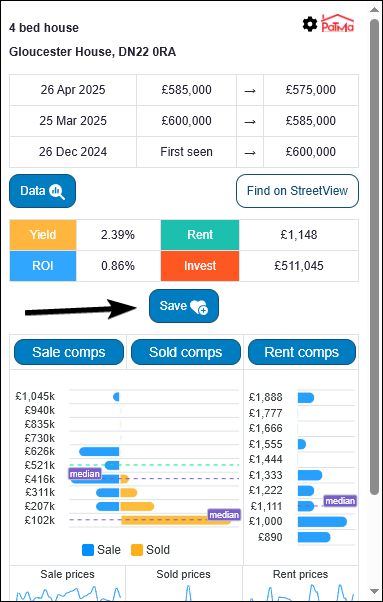
A new browser tab will open. After a short loading period, PaTMa will import the available property data into your account.
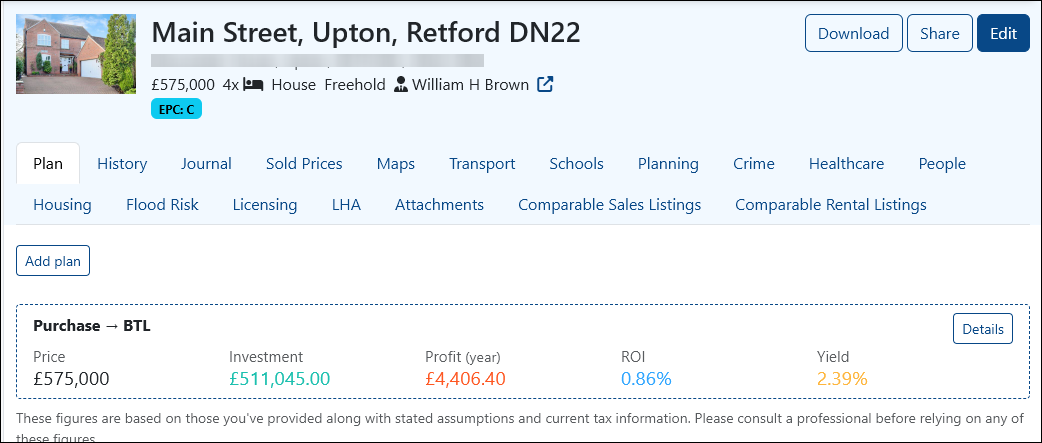
The property will then be available as a prospect in Deal Finder.
Create a Prospect from Deal Finder
You can also add a prospect directly from Deal Finder.
1. Open Add New
From the left-hand menu, select Add New.
You can also open the Add New Prospect page directly.
2. Add the Listing URL
Enter the property's listing URL into the Source URL field.
Select Fetch values and PaTMa will attempt to populate the rest of the form with information from the listing.
If some information isn't collected, you can try Fetch values again or enter the information manually.

3. Add Your Own Information
You can add your own notes or labels to the prospect.
Once you've entered the information you need, select Create Prospect.
The property will then be saved in your Deal Finder account.
Create a Prospect from Property Search
Properties found using Deal Finder's search tools can also be saved as prospects.
Select the property you're interested in and then select Save in the top-right corner of the page.
For more information about finding properties, see Property Search.