Rent Invoicing
Overview
Need to provide formal rent invoices for your tenants?
PaTMa includes an optional Rent Invoicing feature that allows you to generate professional rent invoices directly from a tenancy's rent schedule.
This can be especially useful if your tenants require invoices for:
- Employer reimbursement
- Company lets
- Supported accommodation claims
- Record keeping
- Accounting or tax purposes
Once enabled, invoices can be generated for rent that is due, downloaded as PDFs, emailed directly to tenants, or credit noted if rent needs to be written off.
Before You Begin
Rent invoicing is an optional feature and is disabled by default.
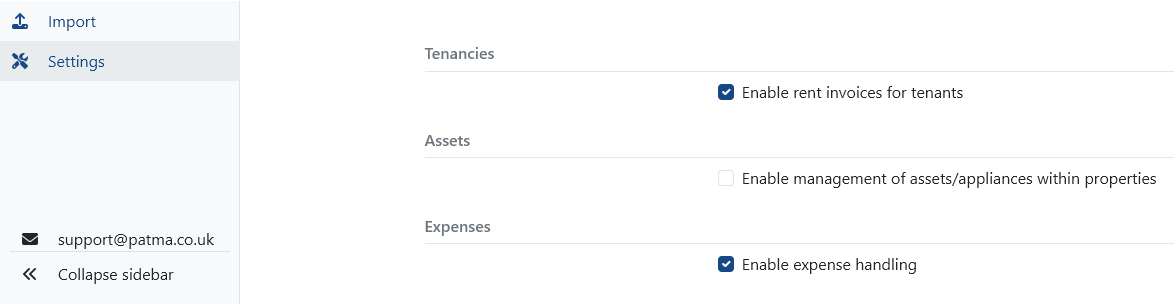
Before you can generate rent invoices, you must first enable the feature in settings.
Enabling Rent Invoicing
Open Settings from the left-hand navigation menu.
Within the Tenancies settings section, locate the option:
Enable Rent Invoices for Tenants
Tick this option to activate rent invoicing.
Once enabled, invoice options will become available within tenancy rent schedules.
Accessing Rent Invoices
To generate an invoice, open the relevant tenancy.
Navigate to:
- Your Portfolio
- Select the property
- Open the Tenancies tab
- Select the tenancy
- Open the Rent tab
This displays the tenancy's rent schedule, including:
- Due rent
- Paid rent
- Outstanding balances
- Invoice options
Generating an Invoice
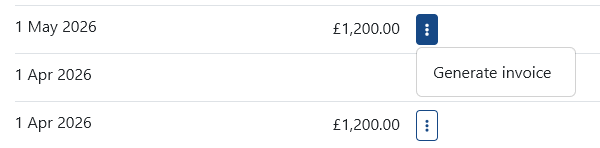
Next to each Due rent entry, you'll see a three-dot menu.
Select this menu to open the rent invoice options.
From here, choose Generate Invoice.
PaTMa will automatically create the rent invoice using the tenancy and rent schedule data already stored in the system.
This helps ensure invoices are accurate, consistent and quick to generate.
What's Included in a Rent Invoice?
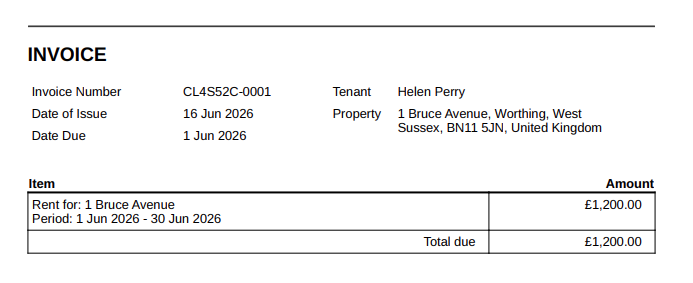
Each generated invoice includes the key information a tenant needs to clearly identify the rent being charged.
Invoices include:
- Invoice Number – Unique reference for the invoice
- Date of Issue – When the invoice was created
- Date Due – When payment is due
- Tenant Name – The tenant responsible for payment
- Property Address – The property the rent relates to
- Rent Period – The billing period covered by the invoice
- Amount Due – The total rent payable for that period
PaTMa generates clear, professional invoices containing all essential billing information without unnecessary complexity.
Managing Generated Invoices
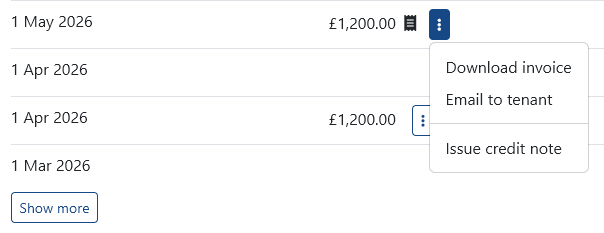
Once an invoice has been generated, several actions become available.
You can:
- Download PDF – Save a copy of the invoice
- Email Tenant – Send the invoice directly to the tenant
- Credit Note – Mark the invoice as credited if rent is written off or cancelled
Credit notes are useful when rent charges need to be reversed, adjusted or waived for any reason.
A Quick Tip
If your tenants regularly request invoices, enabling this feature can save a surprising amount of admin.
Because PaTMa generates invoices directly from your rent schedule, you avoid manually creating invoices each month and reduce the chance of errors.