Delete a Property
Overview
Sold a property? Removed it from your portfolio? Or simply no longer need it in PaTMa?
You can permanently delete a property from your account at any time, but in most cases we recommend archiving it instead.
Archiving removes the property from your active portfolio while preserving all historical records, making it ideal if you may need access to the property's data in future.
Deletion should only be used when you're certain the property and all associated records are no longer needed.
Before You Delete
Deleting a property is permanent and removes all associated data, including:
- Tenancy records
- Rent payments
- Documents and certificates
- Tasks and reminders
- Financial history
- Property images and notes
If you may need access to this information later, consider archiving the property instead of deleting it.
⚠️ Deleted properties can only be restored manually for a limited time, and a restoration fee may apply.
Deleting a Property
To delete a property, open the relevant property from Your Portfolio and select Edit.
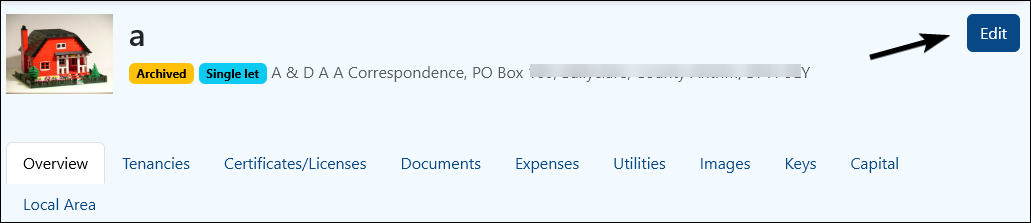
Scroll to the bottom of the Update Property page.
Here you'll see options to either Archive or Delete the property.
Select Delete.

PaTMa will display a confirmation screen to help prevent accidental deletion.
You'll be asked to enter the confirmation text shown on screen.
Once entered, select Confirm Deletion.
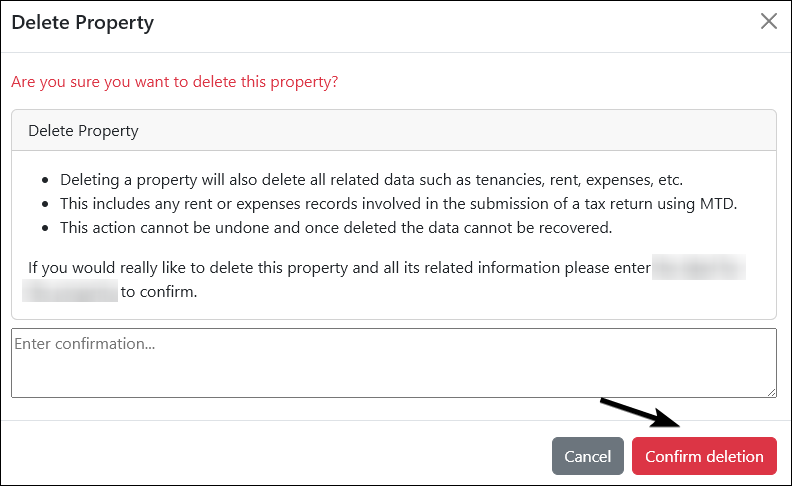
The property and all associated data will then be permanently removed from your account.
Should You Archive Instead?
If you're unsure whether to delete or archive, ask yourself one question:
Will I ever need this property's records again?
If the answer might be yes, archiving is usually the safer choice.
Archiving keeps the property data available for future reference while removing it from your active portfolio, giving you the best of both worlds.