Market Data
Overview
Deal Finder includes market statistics for different regions, helping you keep track of what is happening in the local property market.
You can monitor a whole country or a specific region using a postcode prefix. The data is aggregated weekly and monthly from property listing websites.
The available data includes:
- New listings
- Average list price
- Average list price by property type
- Number of sold properties
- Price changes
- Time to sell
- Sales that fell through
- New rental listings
- Average rental list price
- Time to rent
Add a Region
To view market data, you'll first need to set up a region to monitor.
You can add and manage monitors from the Market Reports page, which also displays any existing monitors.
To add a new monitor:
- Click Add Location in the top right.
- Choose either UK or a postcode prefix.
- Click Save.
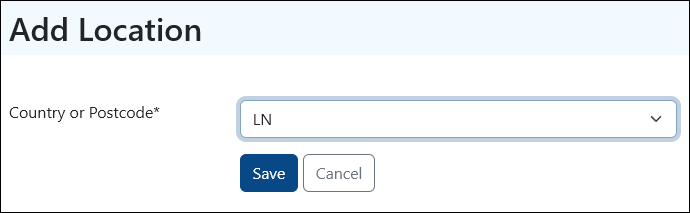
Once the monitor has been set up, you'll receive a weekly recap by email. You can also view the latest market data from your PaTMa account at any time.
View Market Data
From the Market Reports page, click the eye icon next to the monitor you want to view.
You'll be taken to an overview of the market data available for that region.
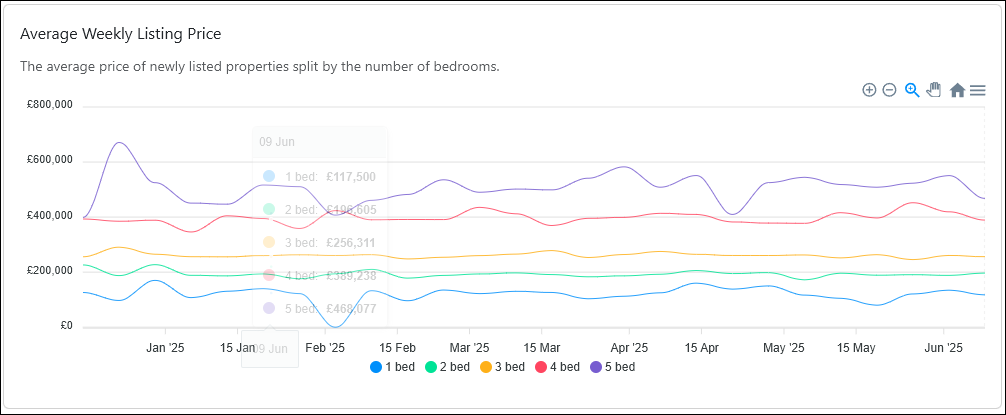
The graphs can be viewed or downloaded, and the underlying data can also be downloaded as a spreadsheet.
Delete a Monitor
You can delete any monitor by clicking the trashcan icon next to it.
Important: Deleting a monitor will remove all associated data and disable the email updates for that region.
You can add the region as a new monitor again at any time.