Buy to Let
Overview
Deal Finder supports three types of property investment:
- Buy to Let
- Buy to Let as an HMO
- Buy to Sell
Buy to Let involves purchasing a property to rent to one or more tenants. Depending on the condition of the property, you may need to invest in refurbishment before letting it.
You may also come across properties that are already being rented, allowing you to purchase a property with an existing tenant.
Deal Finder includes financial calculators to help you understand the potential costs, rental income and profitability of a Buy to Let investment. You can customise the figures based on your own plans and assumptions.
PaTMa also offers a suite of tools for managing rental properties.
Important: Deal Finder's calculations are based on the figures you enter and the estimates provided by the system. They do not confirm whether your figures are realistic. Please consult a professional before making decisions based on these figures.
Creating a Buy to Let Plan
You'll need to have the property added to your Shortlist before you can create a plan.
1. Open the Property
From your Shortlist, select the property you want to analyse.
The Plan tab should open by default. If it doesn't, select the Plan tab.
2. Add a Plan
Select Add Plan.
Deal Finder will create a financial plan for the property, with some values estimated based on information such as the property type and list price.
A typical Buy to Let plan considers three main areas of cost:
- Acquisition: The cost of purchasing the property.
- Refurbishment: The cost of preparing or improving the property before it is let.
- Ongoing Expenses: The costs of maintaining the property and any bills you pay as the landlord.
The plan also considers your expected rental income.
Acquisition
The acquisition section covers your initial investment in purchasing the property.
If you don't have all the figures available, Deal Finder will try to estimate them based on the property's list price.
For more information about the acquisition plan, see the Acquisition Plan.
Refurbishment
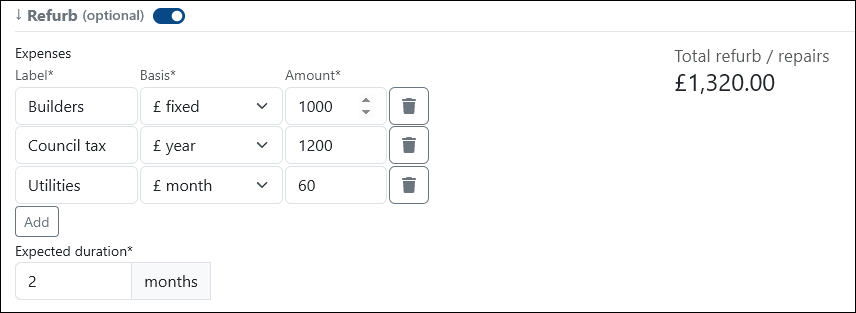
If you intend to refurbish, repair or upgrade the property, switch on the Refurb option.
This adds a new section where you can enter your refurbishment costs and expected timeframe.
Expenses
Add costs for things such as:
- Building work
- Council tax
- Utilities
You can set each expense as a monthly, annual or one-time cost.
Add
Use Add to include any other expense that isn't covered by the standard options.
Expected Duration
Enter how long you intend to hold the property.
This is also used to calculate how many instalments you'll pay for recurring costs.
Rental Income
To set up your expected rental income, scroll to the Revenue section and change it to BTL.
You'll then be able to enter the figures used to calculate your expected rental income and ongoing costs.
As you change the figures, the calculations on the right will update.
Agent
If you use a letting agent, enter their fee or percentage of rent.
Maintenance
Set a budget for ongoing maintenance, usually as a percentage of rent.
Voids
Enter an allowance for periods when the property is empty and not generating rental income.
Expected Monthly Rent
Enter the amount you expect your tenants to pay each month.
Deal Finder will suggest a value for you, but you can adjust this to whatever you believe is realistic for the property.
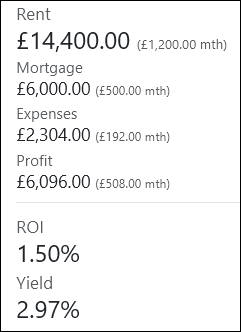
Once you've entered your figures, select Save Plan to store the financial overview.
Viewing Your Plans
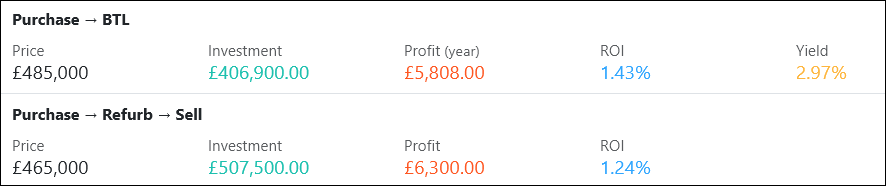
Once you've saved a plan, it will appear on the property's Plans tab.
Each plan is summarised so you can compare your different scenarios at a glance.
Select Details to view more information or edit an existing plan.
All types of financial plan for the property are displayed here.
Important: Deal Finder does not tell you whether your figures are realistic. The calculations are based on your input and the estimates provided by the system. Please consult a professional before making decisions based on these figures.